This is a great tutorial! I never knew how to get the picture there for Stumble Upon! Thank you!

Last night I ran across a Blog that had a StumbleUpon button on their Blog so that people could share their work if that wanted to do so.
I was like how is that possible, WordPress got rid of that. So research I did. Then I ran across Debby Gies’s Google Plus Page where she shared an article about “The Power of StumbleUpon” which I read, then I was like SOB! So there I am at my desk just shaking my head.
So, if you would like to put a StumbleUpon button on your Blog, then follow these simple steps.

Go to your Dashboard,
Then settings
Then click on Sharing.
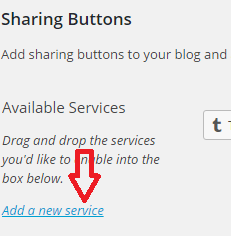
Locate
Add a new Service
When you click on “Add a new service”
A new popup window will open
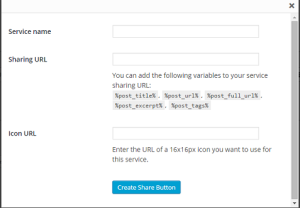
Service Name: Enter Stumble Me (if feeling like a smart butt)
Sharing URL: Copy the below URL…
View original post 87 more words


 The Linden Chronicles
Leave a reply to teagan geneviene Cancel reply